Accidentally dropping your phone in water can be a stressful experience. Whether it falls into a sink, swimming pool, bathtub, washing machine, or gets exposed to heavy rain, water damage can quickly affect your device’s performance and potentially lead to permanent hardware failure.
The good news is that acting quickly can significantly improve the chances of saving your smartphone. Understanding the proper steps to take immediately after water exposure can help minimize damage and increase the likelihood of successful Water Damage Phone Repair.
In this guide, we’ll explain exactly what to do after water exposure, what mistakes to avoid, and when to seek professional repair services.
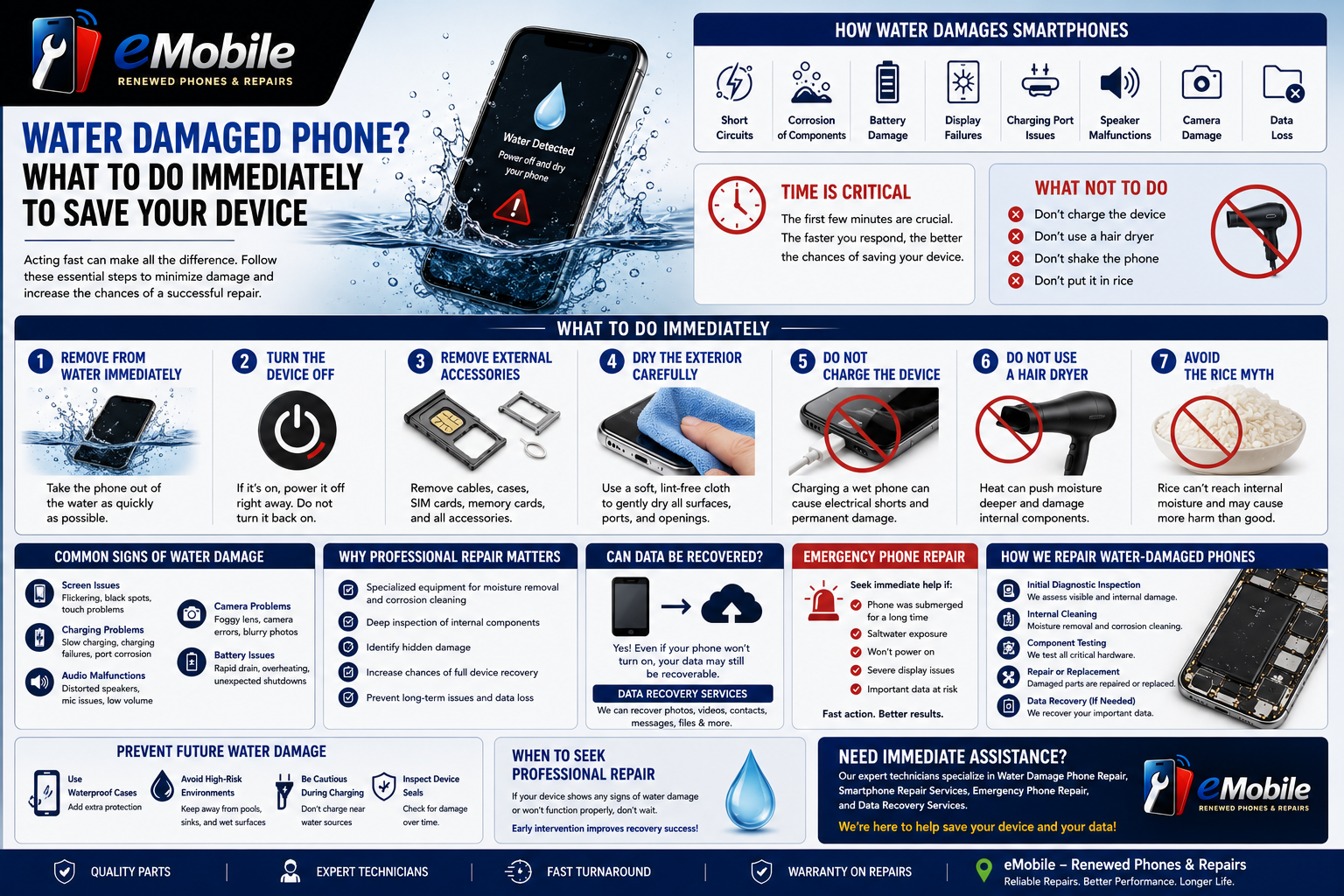
How Water Damages Smartphones
Modern smartphones contain highly sensitive electronic components. When water enters the device, it can cause:
- Short circuits
- Corrosion of internal components
- Battery damage
- Display failures
- Charging port issues
- Speaker malfunctions
- Camera damage
- Data loss
Even water-resistant devices are not completely waterproof. Extended exposure or damage to seals can allow moisture to enter and affect critical components.
First Things First: Stay Calm and Act Quickly
The first few minutes after water exposure are critical.
The faster you respond, the greater the chances of preventing severe damage.
Immediate action can often make the difference between a simple repair and a complete device replacement.
Step 1: Remove the Phone from Water Immediately
The longer your phone remains submerged, the more water can enter internal components.
As soon as possible:
- Remove the device from the water
- Handle it carefully
- Avoid pressing unnecessary buttons
Every second matters when dealing with water exposure.
Step 2: Turn the Device Off
If the phone is still powered on, shut it down immediately.
Why?
Electricity and water are a dangerous combination for electronic devices.
Keeping the phone powered can increase the likelihood of:
- Short circuits
- Component damage
- Logic board failure
If the device is already off, do not attempt to turn it back on.
This is one of the most important steps in preventing further damage.
Step 3: Remove External Accessories
Disconnect and remove:
- Charging cables
- Earphones
- Protective cases
- SIM cards
- Memory cards (if applicable)
Removing accessories helps improve airflow and reduces moisture retention.
It also protects removable components from further exposure.
Step 4: Dry the Exterior Carefully
Use a soft, lint-free cloth to gently dry the outside of the device.
Focus on:
- Screen
- Charging port
- Speakers
- Buttons
- SIM tray area
Avoid shaking the phone aggressively, as this can push water deeper into the device.
Step 5: Do NOT Charge the Device
One of the most common mistakes people make is plugging in a wet phone.
Charging a water-damaged phone can:
- Cause electrical shorts
- Damage charging circuits
- Permanently affect internal components
Before connecting any charger, the device should be inspected and fully dried.
Professional Water Damage Phone Repair technicians often see additional damage caused by premature charging attempts.
Step 6: Do NOT Use a Hair Dryer
Many people believe hot air will solve the problem.
In reality, hair dryers can:
- Push moisture deeper into the phone
- Damage internal components
- Overheat sensitive electronics
- Melt internal adhesives
Avoid using excessive heat when drying your device.
Step 7: Avoid the Rice Myth
For years, people have placed wet phones in bags of rice.
While rice may absorb some moisture from the environment, it often fails to remove water trapped inside the device.
Potential problems include:
- Rice particles entering ports
- Delayed professional repair
- False sense of security
Professional drying and cleaning methods are far more effective than relying on rice.
Common Signs of Water Damage
Water damage doesn’t always appear immediately.
Sometimes symptoms develop hours or days later.
Watch for:
Screen Issues
- Flickering displays
- Black spots
- Touchscreen problems
Charging Problems
- Slow charging
- Charging failures
- Charging port corrosion
Audio Malfunctions
- Distorted speakers
- Microphone issues
- Low volume output
Camera Problems
- Foggy lenses
- Camera errors
- Blurry photos
Battery Issues
- Rapid battery drain
- Overheating
- Unexpected shutdowns
These warning signs often indicate the need for professional Phone Water Damage Repair.
iPhone Water Damage: Special Considerations
Many modern iPhones include water-resistance features.
However, water resistance does not mean waterproof.
Factors that can reduce water protection include:
- Aging seals
- Previous repairs
- Physical damage
- Prolonged exposure
Even if an iPhone appears to function normally after water exposure, internal corrosion may still develop over time.
Professional inspection is often recommended following significant water exposure.
Why Professional Water Damage Phone Repair Matters
Water damage is often more complex than it appears.
Professional repair technicians use specialized tools and procedures to:
- Inspect internal components
- Remove moisture
- Clean corrosion
- Test functionality
- Identify hidden damage
Prompt Water Damage Phone Repair can often prevent minor issues from becoming major failures.
Can Data Be Recovered from a Water-Damaged Phone?
One of the biggest concerns after water exposure is losing important files.
Photos, videos, contacts, messages, and work-related documents may still be recoverable even if the device no longer powers on.
Professional Data Recovery Services can often retrieve information from:
- Water-damaged devices
- Non-functioning phones
- Corroded components
- Failed storage systems
The sooner recovery efforts begin, the higher the likelihood of successful data retrieval.
Emergency Phone Repair: When Time Matters
Some water damage situations require immediate attention.
Examples include:
- Phone submerged for extended periods
- Saltwater exposure
- Devices that won’t power on
- Severe display issues
- Critical business or personal data at risk
Emergency Phone Repair services can help reduce further damage and improve recovery chances.
Prompt action is especially important when valuable data is involved.
How Repair Technicians Handle Water-Damaged Phones
Professional Smartphone Repair Services often follow a structured process.
Initial Diagnostic Inspection
Technicians evaluate visible and internal damage.
Internal Cleaning
Specialized cleaning removes contaminants and corrosion.
Component Testing
Critical hardware is inspected for functionality.
Repair or Replacement
Damaged parts may be repaired or replaced as needed.
Data Recovery
When necessary, recovery specialists attempt to retrieve important files.
This comprehensive approach improves the likelihood of restoring both functionality and data.
How to Prevent Future Water Damage
While accidents happen, preventive measures can reduce future risks.
Use Waterproof Cases
Protective cases provide an additional layer of defense.
Avoid High-Risk Environments
Keep devices away from pools, sinks, and wet surfaces whenever possible.
Be Cautious During Charging
Avoid charging phones near water sources.
Inspect Device Seals
Physical damage can compromise water resistance over time.
Preventive habits can significantly reduce the risk of future incidents.
When Should You Seek Professional Repair?
Seek professional assistance if:
- The device won’t turn on
- The screen is malfunctioning
- Charging problems occur
- Water entered the device
- Important data is at risk
Waiting too long can allow corrosion to spread and increase repair complexity.
Early intervention often improves repair success rates.
Conclusion
A water-damaged smartphone doesn’t necessarily mean your device is beyond saving. The actions you take immediately after exposure can dramatically affect the outcome.
If your phone comes into contact with water:
- Remove it immediately
- Power it off
- Avoid charging it
- Do not use heat
- Seek professional evaluation as soon as possible
Whether you’re dealing with iPhone Water Damage, Android water exposure, or a device that won’t power on, professional Water Damage Phone Repair services can help diagnose the issue, restore functionality, and potentially recover valuable data.
Need Immediate Assistance for a Water-Damaged Phone?
Professional Smartphone Repair Services, Emergency Phone Repair solutions, and Data Recovery Services can help protect your device, recover important files, and maximize the chances of a successful repair after water exposure.